Showing posts with label Bilal Abuzenah. Show all posts

Tuesday, May 8, 2012

Rotate an image in JAVA

//write one program that will rotate an image 180 degrees in a clockwise direction (or counter clockwise
//direction since both give the same result) and one program that will rotate an image 90 degrees in a
//counter-clockwise direction.


public class Lab10a
{

public static void main (String[] args)
{

System.out.println("bilal abuzenah");

// Access and open the picture
String filename = FileChooser.pickAFile ();
Picture p = new Picture (filename);

// call the method to modify the Pictture
Picture p2;
p2 = modifyPicture (p);

// explore (display) the picture
//p2.explore();
p2.show();
String saveFilename = FileChooser.pickAFile ();
p2.write (saveFilename);
// get a new filename and save the picture
//String saveFilename = FileChooser.pickAFile ();
//p2.write (saveFilename);

} // end of main

public static Picture modifyPicture (Picture p)
{
// get the width and height of the picture
int width = p.getWidth();
int height = p.getHeight();
//System.out.println ("The picture is " + width + " pixels wide and " + height + " pixel high.");

System.out.println ("Width: " + width + ", Height: " + height);

// create the new Picture that will be returned
Picture resultPicture;
resultPicture = new Picture (width, height);

// Set up a loop to access all the X position
int xPos;
int yPos;
int xNew;
int yNew;
Pixel pix;
Pixel pix2;
int red;
int green;
int blue;

for ( xPos = 0 ; xPos < width ; ++xPos )
{
for ( yPos = 0 ; yPos < height ; ++yPos )
{
// access the pixel to be modifed
pix = p.getPixel (xPos, yPos);

xNew = (width - 1) - xPos;
yNew = (height - 1) - yPos;
pix2 = resultPicture.getPixel (xNew, yNew);


// get the colr values from the original pixel
red = pix.getRed();
green = pix.getGreen();
blue = pix.getBlue();

// set those color values into the result pixel
pix2.setRed(red);
pix2.setGreen(green);
pix2.setBlue(blue);

//System.out.println ("The picture is " + xNew + " pixels wide and " + yNew + " pixel high.");


}
}

return resultPicture;
} // end of modifyPicture

} // end of class

cropping an image using java

//This lab assignment will have you write at least two methods in java that will create a new image that will
 //show a portion from another image. This technique is called cropping.
//** a specific image was used for this, u need to change the values!!


import java.awt.Color;

public class Lab11
{
public static void main (String[] args)
{

// use the string files to get the first picture,
String filename = FileChooser.pickAFile();
Picture p1 = new Picture (filename);

Picture p2 ;
int x1, x2;
int y1, y2;
// determine the values by using p1.explore()

//Input your values of X, Y of the part you want to crop from the image.

x1 =123 ;
x2 = 621;
y1 = 134;
y2 = 292;

// call method
p2 = cropImg (p1,x1,y1,x2,y2);

//use explore to determine the part you want crop
//p1.explore();

//display the picture
p2.show();

// show the original image
//p1.show();
// get a new filename and save the picture
String saveFilename = FileChooser.pickAFile ();
//p2.write (saveFilename);

} // end of main

// alternate way to access the pixels from three different pictures
public static Picture cropImg (Picture p1,
int x1, int y1,
int x2, int y2)
{
// set up my return variable
Picture p2;

// set dimensions of the new created picture and copy pixels over to p2
p2 = new Picture ((x2-x1),(y2-y1));

// access pixels.
Pixel pixelArray[] = p1.getPixels();

for (int i = 0 ; i < pixelArray.length ; i++)
{
// access the original pixel and information from that pixel
Pixel pix1 = pixelArray [i];
int red = pix1.getRed ();
int green = pix1.getGreen ();
int blue = pix1.getBlue ();
int xPos = pix1.getX();
int yPos = pix1.getY();

// access the portion of the picture to be cropped
if ( ((xPos >= x1) &&
(xPos < x2)) &&
((yPos >= y1) &&
(yPos < y2)) )
{
// detirmine the new location for the pixels
int X3;
X3 = xPos-x1;
int Y3;
Y3 = yPos-y1;

Pixel pix2 = p2.getPixel (X3, Y3);

// Set colors
pix2.setRed (red);
pix2.setGreen (green);
pix2.setBlue (blue);

}

} // end of for loop

return p2;

} // end of cropImg method

} // end of class

combine two sound files to add a "background" soundtrack to a foreground sound.

//This lab will have you combine two sound files to add a "background" soundtrack to a foreground sound.
 //The following files of the Gettysburg Address and the Preamble of the U.S. Constitution are great
 //foreground sound files.


public class Lab13
{

public static void main (String args[])
{
System.out.println("Begin Java Execution");
System.out.println("");

// put your Java Program here

// pick the first file.
String filename = FileChooser.pickAFile();
Sound foregroundSound = new Sound (filename);

// pick the background sound file.
String filename2 = FileChooser.pickAFile();
Sound backgroundSound = new Sound (filename2);

// combine the sounds
// Call a method to combine the two sounds
Sound s3;
s3 = combinesound (foregroundSound, backgroundSound);
// Play the sound
//s3.play();

s3.explore();

// save the new sound file

String saveFilename = FileChooser.pickAFile ();
s3.write (saveFilename);


System.out.println("");
System.out.println("End Java Execution");

}
// Start a combinesound method.

public static Sound combinesound (Sound foregroundSound, Sound backgroundSound)
{
SoundSample[] fg = foregroundSound.getSamples();
SoundSample[] bg = backgroundSound.getSamples();

// set length3 to the length of the shorter sound
int length3;
if ( fg.length < bg.length )
length3 = fg.length;
else
length3 = bg.length;

Sound s3 = new Sound (length3);
SoundSample[] ssarr3 = s3.getSamples();

int pos;

for ( pos = 0 ; pos < ssarr3.length ; pos++ )
{
int amplitude1 = fg[pos].getValue();
int bgp = pos;

while ( bgp >= bg.length )
{
bgp = bgp - bg.length ;
}

int amplitude2 = (bg[bgp].getValue())/3;

// combine the two amplitudes (add them together)
int amplitude3 = amplitude1 + amplitude2;

// check for clipping and resolve
if ( amplitude3 > 32767 )
{
amplitude3 = 32767;
}
if ( amplitude3 < -32768 )
{
amplitude3 = -32768;
}

// store the new amplitude value into sounnd s3
ssarr3[pos].setValue (amplitude3);
}

return s3;
}


} // end of Template class

take the Sound File and create a new sentence from those words.

//Sound File preamble.wav and create a new sentence from those words.
 //The sentence you are to create is:
//We order the common people to perfect liberty.
 //The entire text of the Preamble is:
 //We the People of the United States, in Order to form a more perfect Union, establish Justice, insure
//domestic Tranquility, provide for the common defence, promote the general Welfare, and secure the
//Blessings of Liberty to ourselves and our Posterity, do ordain and establish this Constitution for the United
 //States of America.
http://www.cs.uic.edu/~i101/SoundFiles/preamble.wav


public class Lab14Babuze2
{

public static void main (String args[])
{
System.out.println("Begin Java Execution");
System.out.println("");


// put your Java Program here
String filename = FileChooser.pickAFile();
Sound s1 = new Sound (filename);

Sound s2 = crop (s1, 0, 15730);
Sound s3 = crop (s1, 55845, 65043);
Sound s4 = crop (s1, 15730, 17407);
Sound s5 = crop (s1, 189873, 193815);
Sound s6 = crop (s1, 17407, 26726);
Sound s7 = crop (s1, 63729, 66357);
Sound s8 = crop (s1, 77526, 85410);
Sound s9 = crop (s1, 270027,276597);


// crop the sounds
Sound s10 = join (s2, s3);
Sound s11 = join (s10, s4);
Sound s12 = join (s11, s5);
Sound s13 = join (s12, s6);
Sound s14 = join (s13, s7);
Sound s15 = join (s14, s8);
Sound s16 = join (s15, s9);


// Play the sounds using the "play command"
//s.play();

//esplore the sound in order to get the values
s16.explore();

System.out.println("");
System.out.println("End Java Execution");
}

// Start a method
public static Sound crop (Sound s1, int startIndex, int endIndex)
{
SoundSample[] ssarr1 = s1.getSamples();

// set length3 to the length of the shorter sound
int length3 = endIndex - startIndex ;
Sound s3 = new Sound (length3);
SoundSample[] ssarr3 = s3.getSamples();

int pos;

// copy over s1 into the beginning of s3
for ( pos = startIndex ; pos < endIndex ; pos++ )
{
int amplitude1 = ssarr1[pos].getValue();

// store the new amplitude value into sounnd s3
ssarr3[ pos - startIndex ].setValue (amplitude1);
}

return s3;
}


public static Sound join (Sound s1, Sound s2)
{
SoundSample[] ssarr1 = s1.getSamples();
SoundSample[] ssarr2 = s2.getSamples();

// set length3 to the length of the shorter sound
int length3 = ssarr1.length + ssarr2.length ;
Sound s3 = new Sound (length3);
SoundSample[] ssarr3 = s3.getSamples();

int pos;

// copy over s1 into the beginning of s3
for ( pos = 0 ; pos < ssarr1.length ; pos++ )
{
int amplitude1 = ssarr1[pos].getValue();

// store the new amplitude value into sounnd s3
ssarr3[pos].setValue (amplitude1);
}

// copy over s2 into the end of s3
for ( pos = 0 ; pos < ssarr2.length ; pos++ )
{
int amplitude2 = ssarr2[pos].getValue();

// store the new amplitude value into sounnd s3
ssarr3[ ssarr1.length + pos ].setValue (amplitude2);
}

return s3;
}

} // end of Template class

A Turtle Drawing in java

//use the Turtle class to draw a large multifaceted geometrical shape onto a picture. These modifications are
 //to add "something" to the image. Normally this would be to draw something in the foreground of an image
//that is just a scene.
//*** a specific image was used for this project.


import java.awt.Color;

  public class proj1

{


public static void main(String[] args)

{

// file chooser to pick an image.

String filename = FileChooser.pickAFile();
Picture p = new Picture(filename);

//creat turtles.

Turtle t = new Turtle(p);
Turtle t1 = new Turtle(p);

// set pen width for both turtles.

t.setPenWidth(2);
p.show();
t1.setPenWidth(3);
t1.penUp();
t1.turnLeft();
t1.forward(400);
t1.turn(-90);
t1.forward(265);
t1.penDown();

// locating the turtles usind penUp.

t.penUp();
t.turnRight();
t.forward(230);
t.turn(-90);
t.forward(22);
t.penDown();


// call a method to draw a rectangle
t1.penUp();
t1.turn(-90);
t1.forward(300);
t1.turn(-90);
t1.forward(300);
t1.turn(180);
t1.penDown();
drawRectangle (t1,100,500);


// Drawing a flag for the ship.
t1.turnRight();
t1.forward(100);
t1.turn(90);
t1.forward(300);
t1.turn(135);
t1.forward(80);
t1.turnRight();
t1.forward(80);
t1.penUp();
t1.turn(45);
t1.forward(300);

t1.penDown();

int i1=0;
while (i1<10)
{


// draw a star
t1.turn(36);
t1.forward(130);
t1.turn(144);
t1.forward(130);
t1.turn(144);
t1.forward(130);
t1.turn(144);
t1.forward(130);
t1.turn(144);
t1.forward(130);


i1=i1+1;
} // end while loop.


int i2 = 1;
int len;

while(i2 < 8)
{
len = i2 * 25 ;

// Call a method
drawHexagon (t, len);

t.penUp();
t.turn(-90);
t.forward(20);
t.turn(-90);
t.forward(15);
t.turn(180);
t.penDown();

i2=i2+1;
} // End of while loop


}

public static void drawHexagon ( Turtle t, int size)
{
int i;
i = 1;
// Meathod to draw a Hexagon.
while (i <= 6)
{

t.forward(size);
t.turn(360/6);

i=i+1;
}

}


public static void drawRectangle(Turtle t1,int sides, int length )
{

int i = 1;
while(i <= 4)
{
t1.forward(sides);
t1.turn(90);
t1.forward(length);
t1.turn(90);

i=i+1;
} // End of while Loop

}
}


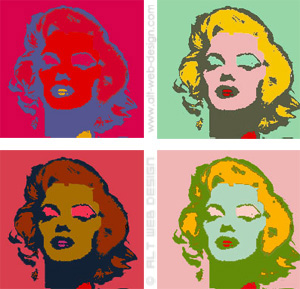
creating silkscreen prints of common images 'java'

//creating silkscreen prints of common images
//you are to be inspired by Andy Warhol to create a collage of at least 4
 //different versions of the same original image.
 //At least two of the versions are to be posterizations using different final colors.
 //The other versions of the image can be done in anyway you like as long as they are not the same.
 //The different versions must be displayed in some grid format of at least size of 2x2 pictures.
 //The code for each version must be written in its own method.


import java.awt.Color;

public class Project3
{
public static void main(String[] args)

{

System.out.println("Begin Java Execution");
System.out.println("");

// put your Java Program here
// Prompt the user for a file

String filename;
filename = FileChooser.pickAFile();
System.out.println("Filename: " + filename);
Picture p = new Picture(filename);

int wid = p.getWidth();
int hgt = p.getHeight();

  System.out.println("The picture is " + wid + " pixels wide and " + hgt
+ " pixel high.");

Picture p2;
p2 = copiedPic(p);
//show the image
//p2.explore ();
p2.show();
System.out.println("");
System.out.println("End Java Execution");
}

// method to make copy from a picture and posterized it

public static Picture copiedPic(Picture p) {

int xPos, yPos;

int wid = p.getWidth();
int hgt = p.getHeight();

Picture result = new Picture(wid * 3, hgt * 2);

// loop for all the x values
for (xPos = 0; xPos < wid; ++xPos) {
// loop for the the Y values
for (yPos = 0; yPos < hgt; ++yPos)

{

// access a pixel and its color
Pixel pix = p.getPixel(xPos, yPos);
Color c1 = pix.getColor();

// store the color information into the resulting picture
Pixel pix1, pix2, pix3, pix4, pix5, pix6;


pix1 = result.getPixel(xPos, yPos);
pix1.setColor(c1);

pix2 = result.getPixel(xPos, yPos);
pix2.setColor(c1);

pix2 = result.getPixel(xPos + 2 * wid, yPos);
pix2.setColor(c1);

pix6 = result.getPixel(xPos, yPos);
pix6.setColor(c1);

pix6 = result.getPixel(xPos + 2 * wid, yPos + hgt);
pix6.setColor(c1);

pix3 = result.getPixel(xPos, yPos);
pix3.setColor(c1);

pix3 = result.getPixel(xPos, yPos + hgt);
pix3.setColor(c1);

pix4 = result.getPixel(xPos, yPos);
pix4.setColor(c1);

pix4 = result.getPixel(wid + xPos, yPos + hgt);
pix4.setColor(c1);

pix5 = result.getPixel(xPos, yPos);
pix5.setColor(c1);

pix5 = result.getPixel(wid + xPos, yPos);
pix5.setColor(c1);

// access the color values of that pixel
int red = pix3.getRed();
int green = pix3.getGreen();
int blue = pix3.getBlue();

// modify the color values of the pixel
int grayAmount;
grayAmount = (int) Math.round((red * 0.299) + (green * 0.587)
+ (blue * 0.114));

computeImage1(grayAmount, pix3); //calls the method to generate image 1 and sends the grayamount and the pixel to it
computeImage2(grayAmount, pix4);
computeImage3(grayAmount, pix5);
computeImage4(grayAmount, pix1);
computeImage5(grayAmount, pix2);
computeImage6(grayAmount, pix6);

}
}
return result;
}
// Start method computeImage set colors for the first Image.
public static void computeImage1(int grayAmount, Pixel pix3) {
int red;
int green;
int blue;

if (grayAmount < 128) {
red = 100;
green = 230;
blue = 34;
} else {
red = 200;
green = 105;
blue = 80;
}

// restore the color value of the pixel
pix3.setRed(red);
pix3.setGreen(green);
pix3.setBlue(blue);
} // End method
// Start method computeImage2 set colors for the second Image.
public static void computeImage2(int grayAmount, Pixel pix4) {
int red;
int green;
int blue;

if (grayAmount < 128) {
red = 100;
green = 50;
blue = 250;
} else {
red = 0;
green = 0;
blue = 0;
}
pix4.setRed(red);
pix4.setGreen(green);
pix4.setBlue(blue);
} //End Method
// Start method computeImage3 set colors for the third Image.
public static void computeImage3(int grayAmount, Pixel pix5) {
int red;
int green;
int blue;

if (grayAmount < 128) {
red = 100;
green = 50;
blue = 250;
} else {
red = 10;
green = 255;
blue = 127;
}
pix5.setRed(red);
pix5.setGreen(green);
pix5.setBlue(blue);
} //End method
// Start method computeImage4 set colors for the fourth Image.
public static void computeImage4(int grayAmount, Pixel pix1) {
int red;
int green;
int blue;

if (grayAmount < 128) {
red = 255;
green = 254;
blue = 102;
} else {
red = 177;
green = 101;
blue = 255;
}
pix1.setRed(red);
pix1.setGreen(green);
pix1.setBlue(blue);
} //End method
// Start method computeImage5 set colors for the Five Image.
public static void computeImage5(int grayAmount, Pixel pix2) {
int red;
int green;
int blue;

if (grayAmount < 128) {
red = 254;
green = 103;
blue = 103;
} else {
red = 104;
green = 254;
blue = 104;
}

pix2.setRed(red);
pix2.setGreen(green);
pix2.setBlue(blue);
} //End method
// Start method computeImage6 set colors for the six Image.
public static void computeImage6(int grayAmount, Pixel pix6) {
int red;
int green;
int blue;

if (grayAmount < 128) {
red = 255;
green = 27;
blue = 139;
} else {
red = 104;
green = 104;
blue = 254;
}
pix6.setRed(red);
pix6.setGreen(green);
pix6.setBlue(blue);
} //End method

}// end of Template class

Hiding a Text Message in a Sound 'java"

//This project will use a technique called "steganography" to encode a text message. Steganography is
//basically hiding one set of data within another set of data.
//For this project we want to take an ascii text message and hide it into the a sound file. We will also want to
//be able to extract the message. For this we will need to write one program that can either encode a text
 //message into a sound or extract a message from a sound. Your program will first first prompt the user to
 //enter the value of either 1 or 2. If the user enters a 1, your program is to perform the encoding.


/**
*/
public class Project

{

public static void main(String[] args) {
// Ask user for what to do
int select = SimpleInput.getIntNumber("what would you like to execute?\n\n1: Encrypt a text message into sound\n2: Extract a text message from a sound");
if (select == 1) {
// Hide The Message
String inputFile = FileChooser.pickAFile();
// prompt user for a file
String message = SimpleInput.getString("Type the message you want to hide in the sound file:");
String outputFile = SimpleInput.getString("Filename of modified sound: ");
encodeSound(inputFile, outputFile, message);
// Encrypt message in inputFile and save it to outputFile
} else if (select == 2) {
// get the hidden text message from file
String inputFile = FileChooser.pickAFile();
decodeMessage(inputFile); // Decode the message in inputFile
} else {
System.exit(1); // Exits if any other digit is input
}
}

// Hides a text message in a sound file.
public static void encodeSound(String inputFile, String outputFile, String message)
{
// Create the sound file
Sound s = new Sound(inputFile);
int nbrOfSamples = message.length() * 3;
// Calculate the number of samples needed for the message including the terminating null character
smoothAmpValues(s, nbrOfSamples + 3);
// Set the one's of the amplitude values to zero.

for (int g = 0; g < nbrOfSamples; g++) {
// Iterate over all samples needed
int asciiValue = (int) message.charAt(g / 3);
// Acquire ascii value for the current character
int digit = getDecimalDigit(asciiValue, g % 3);
// Acquire next digit to encode
int ampValue;
if (s.getSampleValueAt(g) >= 0)
{
// If amplitude is positive
ampValue = s.getSampleValueAt(g) + digit; // then add new value
}
else
{ // If amplitude is negative
ampValue = s.getSampleValueAt(g) - digit; // then subtract new value
}
// Special cases
if (ampValue > 32767)
{
ampValue = ampValue - 10;
}
if (ampValue < -32768)
{
ampValue = ampValue + 10;
}

s.setSampleValueAt(g, ampValue); // Replace amplitude value in the sound object
}
try {
s.writeToFile(outputFile+".wav");
// Save the encoded sound file
} catch (SoundException e) {
e.printStackTrace();
}
System.exit(0);
// Exit program
}

// start a method to set the one's didgit in the frst sample to zero.
public static void smoothAmpValues(Sound s, int nbrOfSamples)
{
for (int g = 0; g < nbrOfSamples; g++) {
int ampValue = s.getSampleValueAt(g);
int modAmpValue = ampValue - ampValue % 10;
// Set one's digit to zero
s.setSampleValueAt(g, modAmpValue);
// Replace amplitude value in sound object
}
}

// start a method to get certain digit from an integer (asciicode =)
public static int getDecimalDigit (int asciiCode, int decimalDigitPosition) {
for (int i = 0; i < decimalDigitPosition; i++) {
asciiCode = asciiCode / 10;
}
return Math.abs(asciiCode % 10);
}

//start a method to decode the message.
public static void decodeMessage(String filename) {
Sound s = new Sound(filename);
// Create sound file
SoundSample[] samples = s.getSamples();
// Acquire the samples from the sound file
int[] digit = new int[3];
// collection containing the three digits of an ascii code
String message = "";
int sampleIndex = 0;
boolean nullReached = false;

while (!nullReached) {
digit[0] = getDecimalDigit(samples[sampleIndex].getValue(), 0); // Acquire the digits
digit[1] = getDecimalDigit(samples[sampleIndex + 1].getValue(), 0);
digit[2] = getDecimalDigit(samples[sampleIndex + 2].getValue(), 0);
int asciiValue = digit[0] + digit[1] * 10 + digit[2] * 100; // and change to the ascii code

if (digit[0] == digit[1] && digit[1] == digit[2] && digit[2] == 0)
// Exit if null character is reached
nullReached = true;
message += (char) asciiValue;
// Attach the next hidden character to the message string
sampleIndex += 3;
if (sampleIndex > samples.length - 1) {
// Print error message and end program if null character is never reached
SimpleOutput.showError("Null character never reached. Possible reason: no hidden text in file.");
System.exit(1);
}
}
SimpleOutput.showInformation(message); // Display the hidden message.
System.exit(0);
}

}